


HaloVPN: Fast Secure VPN Proxy
4.511.62K Reviews
App Specs
- Version
- 19.0.1
- Updated On
- License
- Free
- Downloads
- 10,000,000+
- Developer
- Halo Online
- Categories
- Tools
- Platform
- Android, iOS
Screenshots
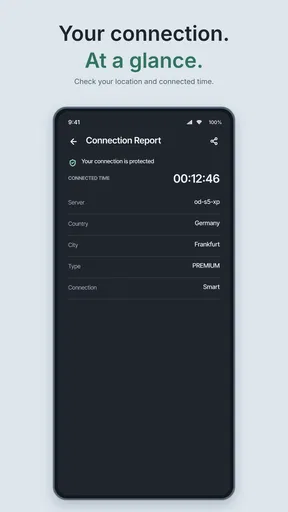
 Analysis by AppCompare
What usually trips me up with a VPN is not the idea of connecting, but figuring out what to try when a page keeps loading or an app behaves differently. I find HaloVPN: Fast Secure VPN Proxy appealing because it aims to make the basic action simple: connect, use the internet, and disconnect when you are done. That straightforward approach is useful for occasional VPN users, though it does not remove the need to troubleshoot a slow or incompatible service.
Where connection problems can begin
A VPN adds another step between your device and the service you are trying to reach. If a site stalls after you connect, the cause might be the selected server, the network you are using, or the site itself. I would not assume every loading problem means the VPN is broken. First, I check whether ordinary pages work and whether the issue is limited to one app or destination.
That distinction matters in everyday use. If a work portal fails while general browsing continues, repeatedly reconnecting may not help; the portal may restrict VPN traffic. If nothing loads, the connection may not have completed or the underlying Wi-Fi may be unstable. Treating those as different problems saves time and avoids blaming the wrong part of the setup.
Simple checks before relying on it
HaloVPN is a free tools app from Halo Online. It has a 4.5 average from around 168,000 ratings, and it has passed 10 million installs. Those figures suggest broad interest, but they do not tell me how it will behave on a particular phone, network, or website. I would test the connection with ordinary browsing before depending on it for a time-sensitive task.
If a connection does not work as expected, I start with a short checklist: confirm that the phone itself is online, close and reopen the VPN app, and try connecting again. If the app offers server choices, switching to another location is a reasonable next step when a particular site is slow or unavailable. I avoid changing several things at once, since that makes it harder to tell what fixed the issue.
HaloVPN is rated for Everyone, is free to install, and is currently at version 19.0.1. It supports Android 8.0 and newer, which makes the minimum system requirement easy to check before installing on an older device. The release date was April 12, 2021. I would still check that the app is current on my own device before troubleshooting, since an old installation can create avoidable friction.
Recovering a disrupted workflow
If the VPN disconnects during a task, I first decide whether privacy or uninterrupted access matters more at that moment. For a quick public-Wi-Fi check, I would pause sensitive activity until the connection is back. For a call, game, or upload that cannot tolerate interruption, I might switch to a trusted network or continue without the VPN if the task allows it. A VPN can add a layer to a connection, but it cannot guarantee that the internet itself will stay steady.
Worth Reading Before You Choose

EA SPORTS FC Mobile 26 Is a Bigger Football Game, but It Takes Time

Flipboard Shows What News Apps Must Do Beyond the Feed

Switching to Android Auto Means Rethinking Your Driving Routine

Google Calendar Makes a Crowded Week Easier to Manage

Ludo King Makes the Most of the Minutes Between Plans

Baby Panda World Brings Quick Play to Modern Phones, but Its Game Library Feels Busy
I also keep expectations modest around location-based access. Choosing a server in another region may help with some services, but websites can use their own restrictions and may still refuse access. When that happens, I try a different server once and then move on rather than spending the whole session cycling through locations. That is a practical limit of VPN use, not necessarily a fault unique to HaloVPN.
When the app may not be the cause
Public Wi-Fi can be slow or unreliable before a VPN is involved, and a crowded mobile connection can create similar symptoms. If performance drops, I compare the same task with and without the VPN on a network I trust. I do this only for ordinary, non-sensitive browsing; for private activity, I keep protection enabled and focus on improving the network instead.
Some services also block or challenge VPN connections as part of their own access rules. If a banking, work, or streaming app stops cooperating, I do not assume that changing locations will solve it. For accounts that require a known network or a workplace-approved connection, the official route is usually the better choice. The useful question is not simply whether the VPN connects, but whether it suits the particular service and task.
Getting Started with HaloVPN
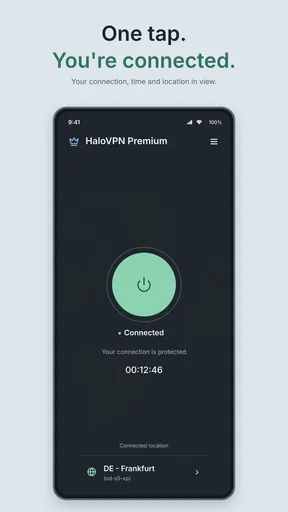
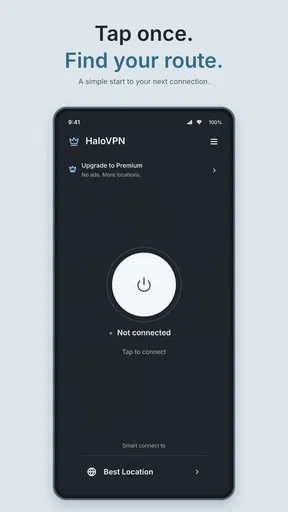
First things first, downloading HaloVPN is as simple as pie. Head over to the App Store or Google Play, and with a couple of taps, you’re set. The installation was smooth sailing—no tech wizardry required. Once you open the app, you're greeted with a clean, user-friendly interface. I must say, it’s refreshing to see an app that doesn’t bombard you with a million options right off the bat.
Interface and Usability
The app’s layout is as intuitive as it gets. You’ve got your big red button to connect and disconnect—it doesn’t get easier than that. Navigating through the app is a breeze. Whether you’re a VPN newbie or a seasoned user, you’ll appreciate its simplicity. No clutter, just straightforward functionality. This ease of use is a huge plus in my book.
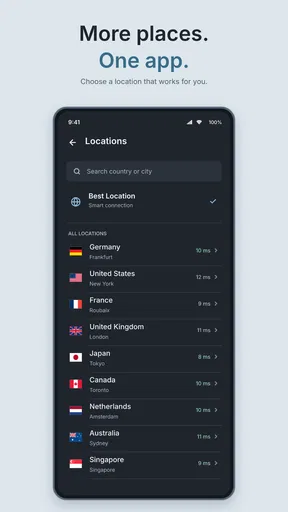
One feature that caught my eye was the server selection. With HaloVPN, you can choose from a range of servers across the globe. Whether you want to hop over to a server in the US or take a virtual trip to Europe, a couple of taps and you're there. This flexibility is fantastic for accessing region-specific content.
Performance and Speed
Let’s talk speed. We all know that some VPNs can slow your connection to a crawl, but not this one. I tested HaloVPN on various servers, and it consistently delivered fast, reliable connections. Streaming was a dream—no buffering, no lag, just seamless viewing. It’s like having a VIP pass to the internet’s fast lane.
During my test runs, I also noticed that HaloVPN maintains a stable connection, which is crucial if you’re into gaming or streaming live content. No one likes being booted off in the middle of a crucial match or a nail-biting episode.
Security Features
Now, onto the big question: how secure is it? HaloVPN promises top-notch security, and it delivers. With AES-256 encryption, your data is locked tighter than Fort Knox. This is especially reassuring when you're using public Wi-Fi. I tested it at a local café, and it was comforting to know my data was safe from prying eyes.
Another nifty feature is the automatic kill switch. If the VPN connection drops, your internet is cut off to prevent any accidental data leakage. It’s a little security blanket that makes a big difference.
Practical verdict for everyday use
A realistic use for this kind of app is connecting before checking personal email or browsing on café Wi-Fi, then disconnecting when you return to a trusted home network. I would open the app, connect, confirm that the pages I need load, and only then start the task. If the connection becomes unreliable, I would stop before submitting a payment or sending important work rather than assume the VPN has made every step safe.
Compared with a VPN built around extensive settings and network controls, HaloVPN’s appeal is its simple, direct workflow. That can suit someone who wants a quick connection without learning a collection of technical options. The trade-off is that people who need detailed control, a workplace-managed setup, or a specific service guarantee should compare specialist alternatives and follow their organization’s guidance instead of choosing on simplicity alone.
For a first-time user, I would treat the server picker as a practical tool rather than a promise of access. Pick a location only when there is a reason to do so, such as testing whether a regional page behaves differently; otherwise, avoid needless switching. If a site rejects one location, one deliberate retry is more useful than repeatedly cycling through servers without a clear goal.
Privacy also depends on habits beyond pressing connect. A VPN does not make a weak password stronger, prevent a phishing message from fooling you, or replace keeping your phone and apps updated. I pair it with familiar precautions: use trusted apps, check the address before signing in, and avoid entering sensitive details on pages that look suspicious. That keeps the VPN in its proper role as one part of safer browsing.
Who is it best for? I’d consider it for someone who wants a straightforward VPN app for occasional browsing on public networks and is comfortable checking that important services still work after connecting. It may be less suitable for people who need predictable access to a particular work system, require fine-grained configuration, or cannot tolerate an interruption during a live session. In those cases, a dedicated service approved for that use—or simply a stable trusted connection—can be the better fit.
Why Choose HaloVPN?
Let’s wrap it up. HaloVPN: Fast Secure VPN Proxy is perfect for anyone who values privacy, speed, and simplicity. It’s a stellar choice for streaming enthusiasts, travelers, or anyone who wants to keep their online activities private. With its user-friendly interface and robust security features, it’s a no-brainer for those seeking a reliable VPN solution.
So if you’re on the hunt for a VPN that’s as easy to use as it is effective, give HaloVPN a shot. You might just find it to be your new favorite app for secure browsing.
My bottom line is to start with a low-stakes task, learn how the connection behaves on your usual network, and keep a fallback in mind for anything important. The app’s approachable style makes that first test less intimidating, while the usual VPN trade-offs still apply: a server choice can affect access, the network can be the real bottleneck, and some services simply do not welcome VPN traffic. Used with those limits in mind, it is an accessible option for casual protection rather than a substitute for every privacy or connectivity tool.
Pros
- Super fast connection speeds.
- User-friendly interface.
- No registration required.
- Supports multiple devices.
- Enhanced privacy features.
Cons
- Limited free server options.
- Ads in free version.
- Occasional connection drops.
- No advanced settings for experts.
- Customer support can be slow.
FAQs for HaloVPN: Fast Secure VPN Proxy
What platforms is HaloVPN available on?
HaloVPN is available for both Android and iOS devices. Users can download it from the Google Play Store or Apple App Store. It's designed to provide a seamless experience across different mobile platforms, ensuring that all users can access secure internet browsing regardless of their device type.
Is HaloVPN free to use?
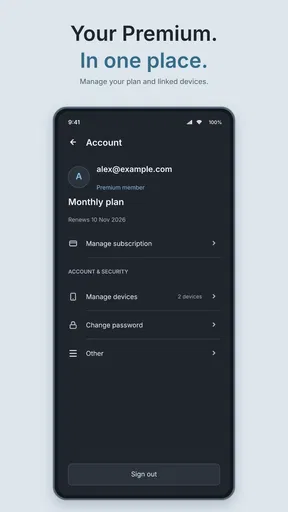
Yes, HaloVPN offers a free version with basic features. However, for users seeking enhanced speed and additional server locations, a premium subscription is available. The paid version provides an ad-free experience and access to more global servers, enhancing overall performance and security.
How secure is HaloVPN?
HaloVPN prioritizes user security by employing advanced encryption protocols. It masks your IP address and encrypts your internet traffic, protecting your data from hackers and ensuring privacy. Users can confidently browse the internet, knowing their personal information is safeguarded against potential threats.
Does HaloVPN affect internet speed?
While VPNs can sometimes slow down internet speed due to encryption processes, HaloVPN is optimized for minimal impact on connection speeds. The app offers a variety of global servers, allowing users to select the fastest one available, ensuring a smooth and fast browsing experience.
How user-friendly is the HaloVPN interface?
HaloVPN features a straightforward and intuitive interface, making it easy for even novice users to navigate. The app simplifies the process of connecting to a VPN server with just one tap, ensuring that users can quickly secure their internet connection without any technical hassle.


